What is your favourite photo editor app for Android phones? HDR Max is a favourite of mine and it makes dull photos look much more eye-catching. Let's take a look at some its best features.
HDR Max is a free app for Android phones and it does have ads in. They are a bit irritating, but are not too bad and can be skipped. There doesn't appear to be an upgrade to remove them, which is a shame because it would be worth paying a small fee to remove them.
The home screen has a strip of thumbnail images across the lower part showing your most recent photos and you can swipe through them to choose a photo to edit. It would be tedious to have to swipe through hundreds to get to the one you want, so there is a button to open the phone's Gallery app . You can then browse photo thumbnails and albums more easily. There is also an option to take a photo too.
Create HDR photos
After loading a photo it appears on the screen and down at the bottom is a collection of tools. An HDR button applies the effect the app is named after and with certain photos, the results are excellent.
There is an A|B button at the top and this divides the screen either vertically or horizontally so that you can see the image before and after. The clarity and colour it brings to photos is excellent and it can turn dull images into ones that are sharper, more colourful and more interesting.

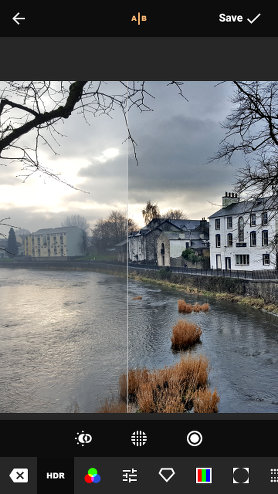
Before (left) and after (right)
However, choosing the right photo to apply the effect to is important and it suits landscapes a lot more than head and shoulders portraits of people or pets.
There are three buttons below the image and these enable you to adjust the strength, detail and glow. Simple sliders enable you to play around and get the effect just right.
Apply filters to photos
Even if you don't want to use the HDR effect, and some subjects are not suitable, there is a useful collection of filters that apply various colour effects to the photo. There are five collections of filters and more than a dozen in each one. Some look very similar so there isn't as much variety as you might think.
Correct photo problems
There are a number of controls for correcting a variety of problems with photos, such as contrast, saturation, brightness, exposure, and colour temperature. These are all sliders and are easy to experiment with.
If the focus is soft, the image can be sharpened with another slider, and colour casts can be corrected, or added if you want to get creative, with sliders for red, green and blue.
Photos can be rotated either to correct sloping horizons or simple for special effects. Images can be cropped, or flipped horizontally or vertically
Add special effects to photos
There are several special effects such as cartoon, which give photos into a sort of drawn painted look. Sliders enable you to control the strength of various aspects of the effect. The fisheye lens effect will not suit every photograph but is useful on occasions.
A tilt-shift effect applies blurring to the edges of the image so as to highlight the subject in the centre and a vignette effect darkens the image towards the corners. You can have a lot of fun with the effects and multiple effects can be combined to give you the result you want.
You can always back out of each effect and cancel it if you don't like it, and you can abandon all changes and start again. If you choose to save the modified photograph, it is saved to its own folder in the Gallery app on the phone.
Conclusion
HDR Max offers a lot of photo enhancement tools in an app that is quick easy to use and free. It enables you to fix photo flaws like exposure, saturation, tilt, contrast and so on. It does not have any option to do detailed photo editing on small areas of the image, and effects are applied to the whole photo. However, it is all most people need when preparing images for sharing on social media. It is recommended.
App: HDR Max (Google Play Store)
Price: Free
By: Wombatica Software
Size: 6 MB
Android: 4.4 and up
Verdict: A good app for correcting photo problems and applying effects.
- Details
- Written by Roland Waddilove
- Created: 29 May 2018