RAW Computing

Windows PC, internet, tech tips, help and reviews

This page has affiliate links
  • Home
    • Browsers
    • Internet
    • Office
    • Reviews
    • Security
    • Tools
    • Tips
    • Web hosting
    • Windows 10
  • How-To
  • Security
  • Archive
  • Courses
  • Shop

Year: 2015

How-To

Move the screenshots folder location in Windows

Roland Waddilove

Where do you save screenshots you take on your Windows computer? The Pictures folder? This is not a fixed location hard wired into Windows and you can store them elsewhere, like OneDrive.

News

Google removes annoying ads with YouTube Red subscription

Roland Waddilove

Google has announced plans to launch YouTube Red and it has three unique features. The first is that it will not have any adverts, the second is that it will contain original content, and the […]

Cloud

Google celebrates 100 million Google Photos users

Roland Waddilove

Last may Google decided to unbundle Photos from Google+ and to launch it as a separate service. Now the company reports that there are over 100 million active users every month, which is pretty impressive.

How-To

Google has recorded everything you ever said – delete it

Roland Waddilove

If you have ever used Google voice recognition features, such as search, you may be surprised to discover that everything you ever said has been recorded and stored. Find it and delete it!

How-To

Stop two major irritations in Twitter for peace and quiet

Roland Waddilove

Twitter has a couple of features that might cause some irritation when using the service and a couple of simple tweaks in the settings can make the social network more pleasant to use.

Cloud

Who can access your files on Google Drive?

Roland Waddilove

You may not be the only one that can access your Google Drive content and apps may also have access. Which apps are they and why do they have permissions? Find out and block them.

How-To

Print to PDF in Windows 10 and forget XPS

Roland Waddilove

The PDF file was invented by Adobe as a way of distributing documents and it has become a very widely used standard. Now support for creating PDF files is built into Windows 10.

Windows 10 File Explorer
How-To

Customise File Explorer in Windows 10 with these tweaks

Roland Waddilove

Windows Explorer is dead. Windows 10 has replaced it with File Explorer, which is almost identical, but it has some new features too. Here are a couple of tweaks to make it even more useful.

How-To

Reset Edge browser in Windows 10 to solve problems

Roland Waddilove

Some people have had problems with Microsoft’s new Edge browser in Windows 10 and it can freeze on a page or pop-up. It is malware, adware or something similar and you need to reset Edge, […]

How-To

How to find the biggest apps and regain disk space

Roland Waddilove

Hard disk drives started out being quite small, then they got much bigger. Now they are small again. Finding the biggest apps and removing them can free up a lot of disk space. Here’s how […]

How-To

Define your own quick actions buttons in Windows 10

Roland Waddilove

Windows 10 has a feature called quick actions. Do you know what they are? Just how quick are they? What do they do? This guide shows where to find them and how to customise them […]

How-To

Use multiple desktops in Windows 10 and spread your apps

Roland Waddilove

Many people work on small screens, such as a laptop or Microsoft Surface, and screen space is limited. Windows 10 enables you to expand the desktop by creating new virtual ones. This guide shows how […]

Hardware

Use touch-screen gestures with Windows 10 Mail

Roland Waddilove

Some laptop computers have touch screens and, of course, the Microsoft Surface is touch-enabled too. What can you use it for? Does it have a use? Sometimes it is indeed useful, such as with the […]

How-To

How to use Quick access in Explorer in Windows 10

Roland Waddilove

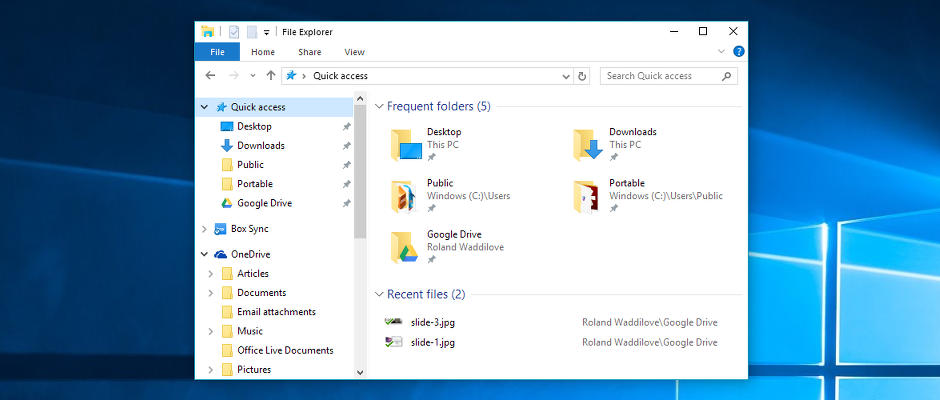
Explorer in Windows 10 has a Quick access section and it is the default view when it first opens a window. Using it is straightforward and it can easily be customised by adding your own […]

How-To

Track your emails and see when they are read with Sidekick

Roland Waddilove

Have you ever sent an email and heard nothing? You don’t know whether it arrived, got lost, whether the person read it, or it was deleted. Sidekick can tell you and it is a handy […]

How-To

Get amazing Google wallpaper for your desktop and browser

Roland Waddilove

If you have ever used Bing to search the web you cannot have failed to notice the fantastic photograph that is displayed. Google has come up with an alternative that is equally amazing and features […]

How-To

Access programs faster on the Windows 10 Start menu

Roland Waddilove

There are lots of little features in Windows 10 that make using the computer simpler, easier or faster. There is a simple trick you can use with the Start menu that will get you to […]

How-To

How to protect your data when working remotely

Guest

More than 30 million Americans work from home at least once a week, which makes data security increasingly important to many people. Whether a storm is keeping you from the office or you work from […]

How-To

Avoid web scams that trick you out of your money

Roland Waddilove

There are many different types of malware on the internet and while browsing sites you might suddenly discover that your browser is frozen and unresponsive and you are locked out. What can you do?

How-To

Create and annotate screen clippings with Microsoft Snip

Roland Waddilove

Microsoft Garage is where the company works on new projects and new ideas. It is a sort of think tank and every now and then it comes up with some great products. Snip is one […]

Posts navigation

« 1 2 3 … 7 »

Search this site

Sale sign It’s the sale season: Grab a bargain!

RAWinfopages recommended apps and services

Infolinks

Have you read these?

  • Phishing emails and scams on a computer grab your money and credit cards
    Here is how phishing messages bypass email filters
  • Replace Windows Firewall with Comodo Firewall
  • Tweak Avast settings to increase security and performance
  • Six steps to improve security for small and middle-sized businesses. Is your business doing enough to stay safe?
    6 steps to improve security for small and middle sized businesses
DISCLOSURE

RAWinfopages is a member of affiliate programs. Payment is received when you buy through affiliate links. It does not affect the price you pay.

AFFILIATE NOTICE

This page contains affiliate links and ads to provide a small income to help with the bills. As an Amazon Associate I earn from qualifying purchases.

Site Information

ABOUT: RAWinfopages
CONTACT: Send a message
TERMS: Terms of Service
PRIVACY: Privacy statement

Advertising privacy

Do Not Sell My Personal Information
OTHER SITES

RAW Apps: iOS and Android
RAW Mac: Apple Mac & macOS
RAWinfopages 2.0: Better than ever

© 2020 R.A.Waddilove