Are there third parties that have access to personal information stored in your Microsoft account? Yes! Use the Privacy Dashboard to see who has access and revoke permission for security.
Private browsing at last! Work, stream and play online on up to 6 devices - PC, Mac, iPhone, Android and more. Save up to 70% with NordVPN.
Computers, phones and tablets all collect information about our activities. Windows, web browsers, online sites and services, applications and so on, all either track us or require us to give up some personal information.
Controlling who has access to what information is not easy because it is spread across multiple services. Here I will take a look at just one service, your Microsoft account, and if you have A Google account you will find similar features that you should check.
Your Microsoft account
If you have Windows 10 then you almost certainly have a Microsoft account because it really doesn’t work properly without one. Users of older versions of Windows find it easier to live without a Microsoft account, but one is useful anyway, because of services like OneDrive online storage, Outlook email, and Office web apps.
In your Microsoft account is personal information, contacts, possibly email and more.
To access your Microsoft account:
- Go to the OneDrive or Outlook websites
- Click your picture in the top right corner
- Click View account
Microsoft Privacy Dashboard
Once into your account, select Privacy in the menu bar. For security you may be prompted to enter your password again and then the Privacy Dashboard then appears.
If you have problems accessing it, try Edge instead of Chrome. Sometimes Google’s browser doesn’t work for some reason.
There are several sections that enable you to view and delete activity data for Cortana, search, web browsing, movies you have watched and music listened to, but skip these for now and scroll right down to the bottom of the page.
Look for Apps and services, and click the link Apps and services that can access your data.
Revoke access permissions for apps
A list of apps that can access your Microsoft account to some degree is displayed and everyone’s will be different. This is my list and it contains apps and services I use today, but also ones I used years ago that still have access.
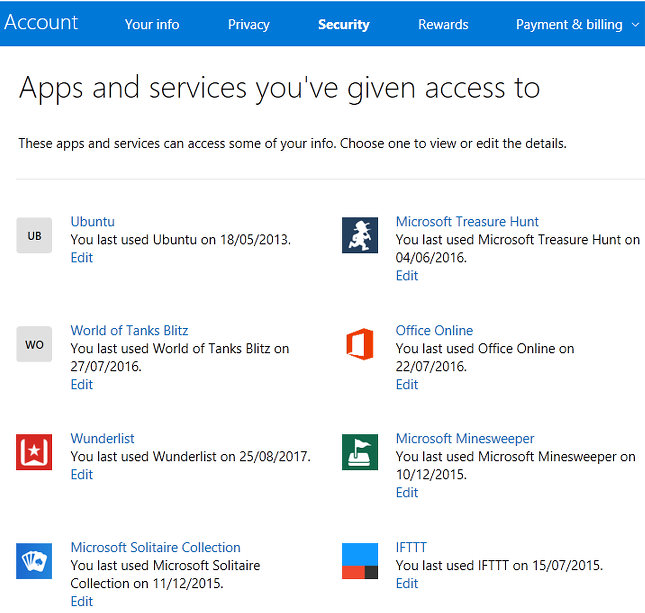
If you do not use a service or an app that has access, or if it is old and no longer exists, it is best for privacy and security if you revoke permissions. For example, I once used Ubuntu Linux way back and obviously gave it permission to access my Microsoft account, although I have forgotten why. It can be seen from the date when the app or service was last used and in this case it was 2013!
Click the Edit link for any item you want to view or modify.
The information that it can access is displayed and, if you really don’t need it anymore, there is a Remove these permissions button at the bottom. Click it.
Repeat the process with any other apps and services you no longer use. Remove permissions and you make your Microsoft account safer and more secure.
Too many permissions?
Even if you are keeping items, click them to see what they can access. Sometimes it is quite surprising and you may think that they go too far. For example, here is World of Tanks Blitz.
It can see my name, gender, picture, contacts and friends. It can get my email address and connect to apps and services using my Microsoft account.
If you don’t agree with any of this, remove the permissions. However, the app, game or service may not work properly without them, so think about it before proceeding.
What is likely to happen is that you will be prompted to allow permission all over again if you run the app again. It is your choice.
Be the first to comment