Privacy on the internet is currently a big issue and rightly so, we should all be careful what we share. PureVPN has made a Chrome extension that helps you browse the web more privately.
Browser vs stand-alone VPNs
New articles are posted
on rawinfopages.co.uk
Go Windows PC articles
There are two ways that a VPN can be implemented and the best way is through an application that is installed on the computer’s drive. Running the VPN software enables a private, secure, encrypted internet connection to be made to a VPN server.
When websites and services try to work out your location and other details about you, the VPN gets in the way and blocks it, or at least misdirects it and you seem to be located elsewhere.
The secure connection means that people locally, such as on the same Wi-Fi, perhaps at a public hotspot in a café or hotel, cannot spy on you.
A stand-alone VPN application encrypts internet traffic at a low level, so all applications that use the internet go through it and are therefore protected.
A browser-based VPN is provided as an extension and there are VPNs for Chrome and Firefox. The main difference between a VPN browser extension and a VPN application is that the extension only protects the browser. Any other applications that access the internet are not protected or private.
A browser VPN extension has a narrower scope, but let’s face it, web browsers are among the most used applications on the computer these days. Most of what we do is through a browser, so a browser-based VPN is not that much of a limitation, but you do have to remember that other apps are not secure.
Related: Use a VPN when you are travelling to improve internet access
PureVPN Chrome extension
Unlike the PureVPN application, the PureVPN Free VPN Proxy Chrome extension is free and after adding it to Chrome it can be used to increase your privacy and to hide your location.
Click the PureVPN in the toolbar and a panel opens with two options. You can log in if you have an account or you can sign up for free. Signing up simply involves providing an email address through which you can receive your login details.

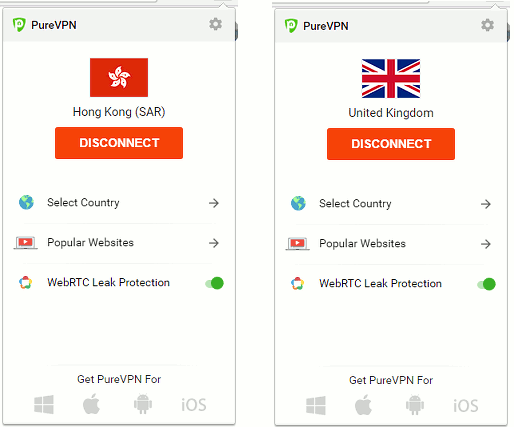
After logging in, you can choose a country to connect to, which can be your own or someplace else. There are a more than 25 different countries to choose from, but nothing like the 700 or more servers and locations that are available with a full PureVPN account and software. It is a free service though.
I connected to a US VPN server I tried a few services that work out your location, such as whatismyipaddress.com. They did not agree on my precise location although all agreed that I was in the US. I am not, so that was good.
There are around 30 popular websites in a menu that make visiting them a simple point and click. The sites include Netflix US, BBC iPlayer UK, SkyGo Italy, and so on. Many are US based services and this is useful for people that are travelling or holidaying outside of the US because it lets them access services they may have paid for back home.
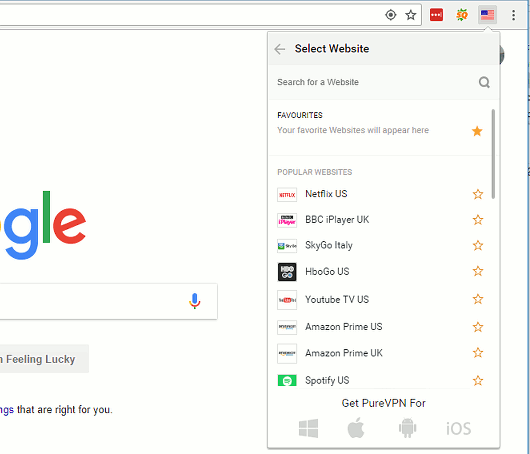
Any country or website can be added to a Favourites section so you don’t have to hunt for them.
Is it worth it?
You get what you pay for and this is a free extension. If you are on a tight budget and cannot afford a full VPN then this Chrome extension will do. Just remember that it only covers your browsing activities and even then not completely. If your opened another browser, like Microsoft Edge, it would connect to the internet normally.
To get full protection for every browser and application that accesses the internet, get the full PureVPN software (my affiliate link - it makes no difference to the price you pay). Prices for VPNs are really low at the moment and there are some great deals available.
Related: Net neutrality is dead. Do we all need to use VPNs now?
I have used BlackVPN for a couple of years now and I find it great - servers in US, UK, Netherland and a host of eastern european countries (even one in singapore). No speed issues (have a slowish broadband connection anyway - 2Mb) and cheap (€5 per month for one server up to €9.50 per month for access to all of them. Gets my vote anyway.
Regards
I used Astrill for two years two – one in Guangzhou, one year traveling, and a few months in between traveling. I remember it not working twice in Xinjiang, but both times it was back on in a day or so.
Their headquarters are in the Philippines, and their customer service has a few odd quirks, but I didn’t have any major problems with it.
One feature I really liked was the ability to have the VPN hide my location *only* when browsing sites blocked in China – which meant I could download material from Baidu or other sites without switching off the VPN. For similar reasons, I also liked the ability to choose my location.
PureVPN is amazing, thanks for sharing