The iOS App Store notifies you when there are updates on the iPhone. Or does it? It actually only shows some updates and it hides others. See all updates in the App Store and update your apps.
For some reason, the iPhone App Store app, and it is probably the the same on the iPad too, only shows you some of the app updates that are available for your device. It does not show all of the updates that can be downloaded and it holds some back. Why does it do this and how do you reveal all of the updates?
App store notification badge
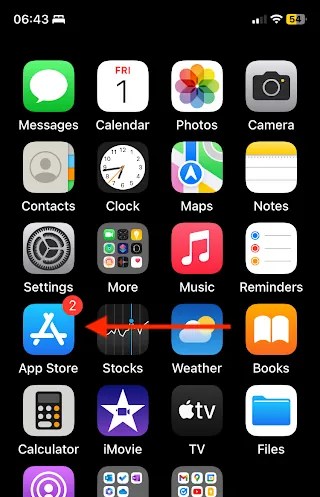
When there are updates to the apps on your iPhone, the App Store icon on the home screen shows a badge that indicates the number that are available. In the screenshot above you can see that there are two app updates available for this iPhone. Press the App Store icon.

Open the App Store and in the top right corner is your account picture. It has a badge to indicate the number of updates that are available, if there are any. In the screenshot above you can see it is the same number as was shown on the App Store icon on the iPhone home screen.

Press your account picture and your account screen is displayed. It will not have the same apps as my iPhone, but you will see one list of available updates and another list of apps updated recently. You can see in the screenshot above that it once again says that there are two app updates available and there is an Update All link. Don’t press it!
Refresh to see all updates
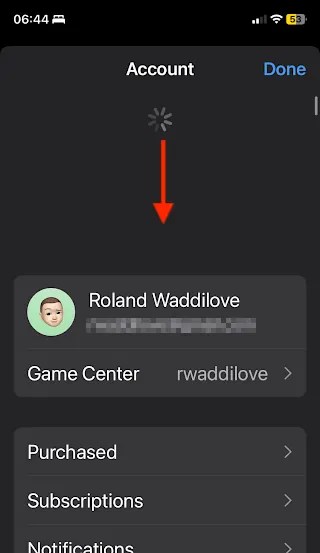
Go back to the top of this Account screen and pull down on it and then let go. You will see the spinning cog wheel which indicates that it is looking for new content. It is the same action used in many apps to refresh the content.

Now look at the available updates in the screenshot above. It found 13, which is amazing when it originally said that there were only two.
I don’t know why it hides all these other updates. It’s not as if they need to be hidden and they are just regular app updates. It just seems to be that iOS drip feeds app updates to you a few at a time.
Maybe some updates are hidden to lighten the load on Apple’s servers, spreading out updates over several days or even a week, instead of having everyone download the updates as soon as they are available.
I usually install app updates when I plug the iPhone in to charge, rather than using the battery. Before updating, I pull down on the accounts screen and get all of the updates available, not just the two or three it shows me.
This is a weird feature of iOS (and iPadOS), that you should know about. Even if no updates seem to be available, this trick can reveal that there are actually several updates and you just aren’t being notified.
 RAWinfopages