
Does your phone get hot? What is causing it and what is the solution? There are several causes and there are easy ways to avoid the problem to a certain extent. Stop damaging your phone.
Heat is bad for the battery in a phone and excessive heat is bad for the CPU and other chips it contains. You should not allow your phone to overheat if at all possible and a cool phone will last longer, be more reliable, and the battery will be healthier.
If the battery in your phone is already damaged by excessive heat, there probably isn’t any way to restore it to full health, but at least you can prevent it from getting any worse. It is best to avoid excessive heat from day one, but looking after your phone is beneficial at any time.
There are many reasons why your phone is overheating and the solution to each one is different. Let’s take a look at them. The advice applies to Android phones and iPhones.
Related: How to show hidden app updates on the iPhone with a swipe
You are charging your phone wrong
Charging a battery in any device generates heat and the phone is no different to anything else. However, how you charge makes a difference to how hot the phone gets and how damaging it is to the device.
A slow charger generates less heat than a fast charger, so if you are not in a rush, charge the phone with a low power charger. Your phone will not get as hot. A slow charger that takes 8 hours to charge the phone is useful if you frequently charge overnight. Slow and steady is best.
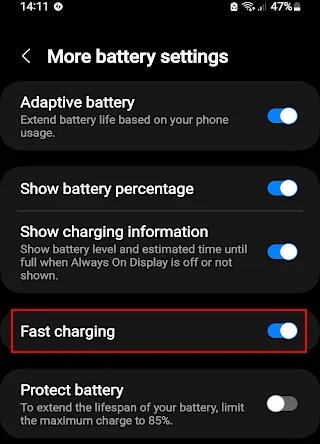
The phone may have a fast charging option in settings. Turn it off if the phone gets too hot. It takes longer, but the phone stays cooler, which is good for the battery and other components.
Make sure there is nothing covering a phone when charging. Ideally, prop it up so air can get under it as well as over it. It will keep it cooler.
An app is misbehaving
Apps are not perfect and sometimes they get into a muddle because of a bug or poor programming. Anything can happen when an app goes wrong, including spending a lot of time, effort and CPU activity doing nothing useful. The program equivalent of running around in circles at top speed. It generates a lot of heat in the phone and it gets hot.
One result of this is that an app stresses the system, causing a lot of heat to be generated. Quitting the app may solve the problem and it lets the phone cool down. Swipe up from the bottom or press a button, whatever you do to access the task switcher on your phone and swipe away or close all the apps that are running.

After closing all apps, hold down the power button, or whatever you do on your phone, and press Restart. A fresh start fixes overheating problems caused by misbehaving apps.
Check for app updates because they often fix bugs which cause overheating. Beta versions of the operating system may also cause overheating. Wait until release day before upgrading the OS.
Keep it out of the sun
Phones get very hot when they are exposed to the sun, especially black ones. The sun’s heat can damage a phone, so if you are outside on a sunny day, keep your phone in a bag or your pocket where the sun cannot reach it.
Do not leave your phone in a car on a hot day. The temperature can reach levels beyond the operating range of a phone and damage may occur. Do not put it on the dashboard. If you must leave your phone in the car, put it in the boot where it is cooler.
Don’t cover it up
Avoid covering the phone. I have seen devices plugged in to charge, then a newspaper or magazine has been thoughtlessly dumped on top. Or a phone may be plugged into charge and it slips down between cushions of the sofa, or even under a sofa or bed while charging. This will cause the phone to get hot, much hotter than normal charging and damage may occur.
A phone will get slightly warm in a pocket because of body heat, but it should not get overly hot.
Avoid apps that make the phone hot
Apps require processing power and some apps require a lot. Working the CPU hard generates a lot of heat and causes the phone to get hot. Avoid them as much as possible.
Sometimes it is unavoidable. For example, the camera app, especially when recording video, can cause the phone to get hot. Taking photos or videos outside on a sunny day can cause a phone to shut down because of heat build up.
There isn’t much you can do to avoid it if you need to take a photo or video, but close the camera app when it is not actually being used and don’t leave it onscreen.
Some games push the hardware to the limit and can heat up even top-of-the-range phones. A small increase in temperature is normal and is OK when playing games, but try to avoid those that make the phone too hot to hold. That is not good for the health of the device or the battery.
Old phones and budget phones with less processing power should avoid games that push them too hard. What if it is your favorite game? Well, it is up to you, but you might want to look for something else to play.
Remove the protective case
A lot of people use a protective case for the back of their phone and a screen protector on the front to prevent scratches and damage if it is dropped. They act as insulators and prevent heat from leaving the device and make heat build up even worse.
The phone will get hotter when it is charging and when used for demanding apps like games and photos/videos, but you may not notice how hot it is getting because of the case. If you are noticing the heat through the case, just imagine how bad it must be in the phone.
Be aware of this. Maybe remove the case when charging or playing games to allow the heat to dissipate.
 RAWinfopages