A good weather forecast app is an essential app to have on a phone and it is probably one you look at every day. Is it right? Here is how to report the real weather when it is wrong.
The Apple Weather app is pretty good, but it is not perfect and while most forecasts are accurate, sometimes it rains when it should be just cloudy and you get wet when you didn’t wear a coat. Rain may be forecast or cold weather, and you dress appropriately, but it never happens and you carry a coat or an umbrella needlessly. Storms may be predicted, but they aren’t half as bad as the app says, or a mild storm is much worse than predicted.
I wouldn’t be without a weather forecast app like Apple Weather, even though it is not perfect. They are often right, but on the rare occasions when it is wrong, you can report the real weather. This is partly for the satisfaction of telling the app developers they are wrong, but partly because it could help them improve the forecasting.
If you are running the latest version of iOS on an iPhone, here is how to report the real weather when the Apple Weather app gets it wrong.
Related: See historical temperatures and rainfall in Mac Weather app
1 Check the weather forecast
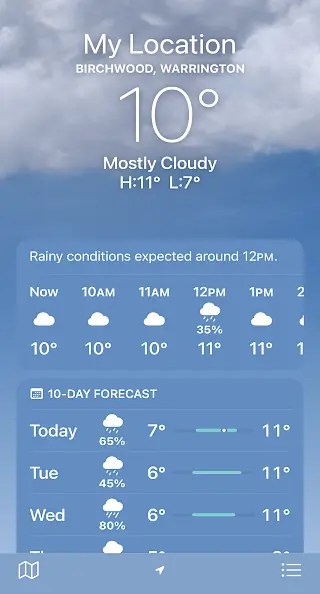
Open the Weather app on the iPhone and look at the forecast. It is usually accurate, but if it is incorrect, swipe up the screen.
2 Report an issue

Keep on swiping up in the Weather app until you reach the bottom of all the data. There is a section titled Report and Issue. Press it if you want to describe the real weather conditions.
3 Overall conditions and temperature
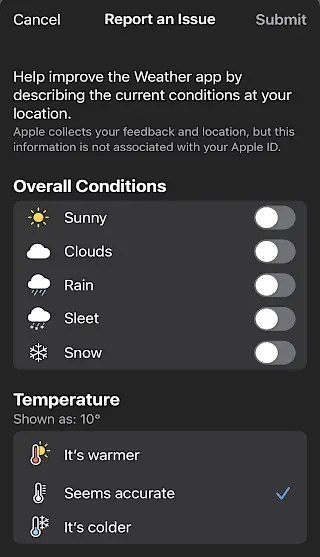
A lot of controls are presented on the next screen and it starts with Overall Conditions and Temperature. If it seems Warmer or colder than the Weather app says it should be, tap the appropriate indicator. If there is sun, cloud, rain, sleet or snow, press the appropriate switch to select it.
4 Select the conditions

The overall conditions are not simple yes/no switches. Turn on a switch and options are displayed that enable you to specify conditions in more detail. For example, turn on Clouds and there are options to select partly, mostly or fully cloudy.
Multiple switches can be selected at the same time, so it could be mostly cloudy with light rain for example. The other switches have similar options. Select what best fits the current weather.
5 Wind and pollution
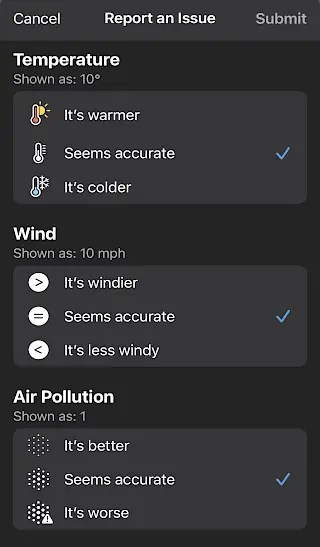
Swipe up to access more types of weather information. For example, you can say if it seems windier or less windy than the Weather app predicts, or if the air pollution is better or worse.
6 More conditions and descriptions

Right down at the bottom is Other Conditions and you can report that there is a rainbow, lightning, hail, smoke, fog or haze. Smoke is not predictable, so it could be useful information that could be reported and passed on to other users of the app.
You can also say how the conditions feel, like pleasant or unpleasant, hot or chilly, muggy or dry, windy or calm. It is not strictly speaking, weather data, but it might be useful to report it.
When you have finished selecting the weather conditions, don’t forget to press the Submit button in the top right corner of the screen.
I don’t know if or how this information is used, but it potentially could be useful to others in your area. For example, the Weather app cannot predict that a rainbow will appear, but I wonder if you report one whether it will appear in other people’s Weather app in your area.
It is certainly possible for local weather reports to be used this way, but it does require that people actually use the reporting feature in the Apple Weather app. Do you use it? Maybe you should.
 RAWinfopages