Did you know that you can manage payments, passwords and rewards, and track orders with Wallet in Microsoft Edge Wallet? This feature is hidden in the browser’s settings, and it’s useful.
Microsoft Wallet is like other wallet services, such as Google Wallet and Apple Wallet. It enables you to make payments, store credit, debit and loyalty cards, track orders and rewards, and make charitable donations.
Google has Android phones and Apple has iPhones, so you can hardly have missed their wallets, but Microsoft’s may have flown under your radar, and you may not have heard of it. It is not quite the same as Google and Apple’s wallet apps and services, but it is something you should know about, and it may be useful to you.
You can use Wallet on a Windows PC or an Apple Mac.
Related: How to browse the web securely with Microsoft Edge VPN
Open Edge wallet
If you have Microsoft Edge browser on a Windows PC or Apple Mac, enter edge://wallet into the address box and Microsoft Wallet is displayed. You can also get to it by going to Settings > Profiles > payment info. There is a Go to wallet link next to Try the new management experience in Wallet. Settings can change, so type the URL if you cannot find it.

There is a menu on the left and then information on tiles on the right. If you have not used it before, you may see some tips for getting started at the top. Click it, and you are prompted to add your first credit or debit card, review your passwords, redeem points for gift cards, and save with cashback offers.
Earn Microsoft Rewards
Microsoft Rewards points are earned by using the Bing search engine instead of Google, providing you are signed in to your `Microsoft account. However, click Earn rewards on the Microsoft Rewards tile in the Your assets section, and there are ways to boost the points by engaging in various activities. Simply looking at the weather forecast earns rewards points. There is also a quiz, a poll, a quote of the day and more.

Click Redeem on the Wallet Microsoft Rewards tile, and you can swap points for gift cards that can be used at popular online stores. The stores depend on your location and I see a lot of UK stores because I am in the UK. If you are in the US, you will see US stores.
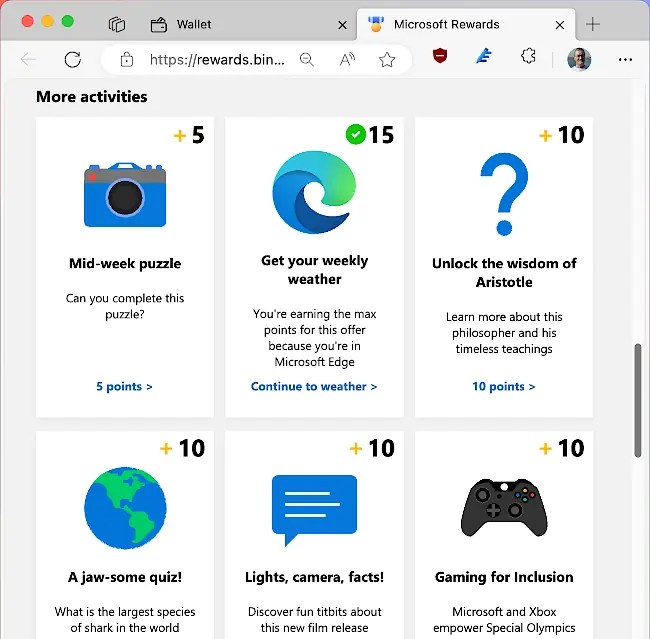
I have earned rewards points in the past to get gift cards and have used them to get money off online purchases. That’s nice, but it does take a long time to earn sufficient points for a gift card.
Earn Microsoft Cashback
Cash can be earned in Microsoft Wallet. Click the Cashback offers button on the Microsoft Cashback tile on the Wallet Home Screen. There are dozens of online stores where you can earn cashback when you purchase goods or services.

The amount you earn depends on what you buy, for example, I saw offers of 23.1% cash back on ESET security, to 1.92% on Qatar Airways. It varies a lot. If you want to see the cashback offers without using Edge Wallet, go to bing.com/rebates in any browser.
Back at the Wallet home page in Edge browser, click Get Paid on the Microsoft Cashback tile. You are shown your earned cash, pending earnings, and lifetime earnings. When you visit the page, a popup panel enables you to transfer cash to your PayPal account.
If you buy goods using Wallet, you can track orders by going to Wallet > Order tracking
Add credit/debit cards
Select Payment methods in Microsoft Wallet in Edge and you can add one or more credit or debit cards. The information is used when you purchase items through Microsoft payments, like Microsoft 365 (Office) and the Microsoft Store. You may already have a payment method set up, but if you haven’t purchased anything from Microsoft and don’t intend to, you don’t have to add a credit or debit card.
Check your passwords for leaks
Select Passwords in the Wallet sidebar to see password statistics, like the number of passwords saved in Edge, the number of weak or reused passwords, and the number of leaked passwords. A password manager app or extension is better than storing passwords in Edge because it is available outside the browser and in more places. However, but you may find it useful to also store some passwords in the browser as a backup to your password manager.

Click the leaked passwords tile to scan your passwords. It reports when they were last scanned, which happens automatically, so you may see that they were checked recently. You should obviously change any passwords that have been leaked as soon as possible.
Is Wallet worth it?
You don’t have to use Microsoft Wallet in Edge browser, and if you do use it, you don’t have to use every feature. I use it to store passwords and personal info for form filling, and the rewards points. It is useful to add credit/debit cards if you purchase items from the Microsoft Store becsause it makes the buying process easier.
The rewards are the nice. It takes a long time to earn sufficient points to get gift cards, but it has saved me money on purchases. Cashback is another way to save money on purchases. If you are going to buy something from a store anyway, why not take advantage of the cashback to get some of your money back?
Edge Wallet makes it easier to manage all these things. Check it out next time you are using Edge on a desktop computer. Wallet is not in Edge for phones, but you can visit the Microsoft Rewards website in the browser, and Rewards are in the Bing and Start phone apps.
 RAWinfopages