
Improve your life by encouraging good habits and discouraging bad habits. Many phone apps can help with this, but some are expensive. These four apps for the iPhone are cheap or even free.
When the subject of habits arises, we often think of bad habits. We all have a few, but habits can also be good. For example, going to the gym regularly or engaging in another exercise is good for us. Drinking plenty of water helps to keep you healthy. You might want to read books, meditate daily, and write in a diary or journal every evening. Many more good habits are worth encouraging. There are also habits you may want to break, like drinking, smoking, caffeine, junk food, and so on.
Habit tracker apps for the iPhone aim to help you build good habits and break bad ones. They do this by enabling you to record when you perform some action you want to turn into a habit. You can tick off the days you go to the gym, each time you drink a glass of water, go a day without alcohol, and so on.
Ultimately, it is up to you to form good habits and break bad ones, but habit tracker apps make it easier by tracking your progress and reminding you to do or not do something. They gamify habits by recording achievements, streaks, and so on. Search for these apps in the App Store to add them to your iPhone.
Related: See all iPhone articles
Habitty – Habit Tracker
Habitty is a small iPhone app that is just 5 MB. It is also free, it has no restrictions, and there are no adverts. It may be too basic for some people, but I like it.
Habits are listed on the home screen in a compact format. Each habit has a progress ring, name, and five ticks/crosses showing whether they have been completed during the last five days. A tap adds or removes a tick. The display makes it easy to see your progress, and the days you completed or missed your habit.
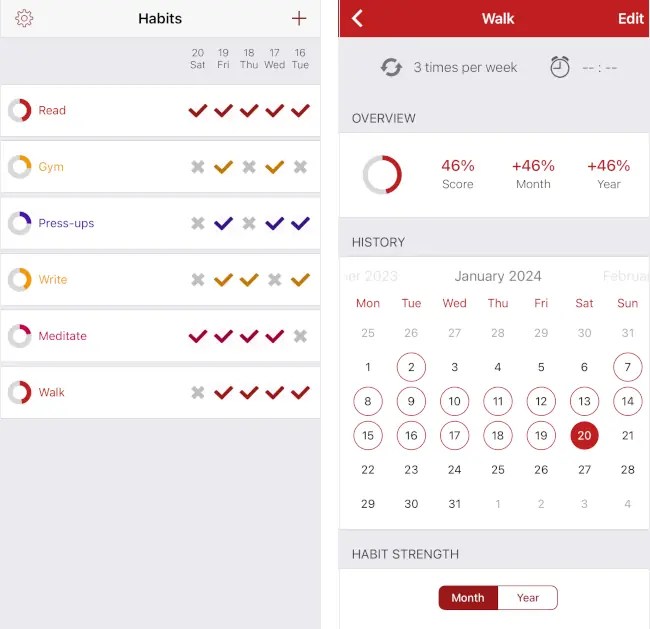
When setting up habits, you choose how many times a day or week you want to do them. This works well and you can tick the days you do them. Although it is possible to add a habit you do multiple times a day, like drinking eight glasses of water, I could not find a way to track the number of times you do it. It is up to you to count and then tick the whole day as done or not.
Tap a habit to display a statistics screen with an overview that shows your score for the month and year. A calendar shows the days you did the habit, and you can add or remove the habit from days. A chart shows the habit strength over time.
Habitty is a simple app that is easy to use, easy to update, and tracks your habits in a very clear way. It
HabitShare – Habit Tracker
HaboitShare is another small app that won’t take up much storage space on your iPhone. It is also free, so it won’t affect your bank balance, which is nice, and it makes a change from all the subscription apps in the store. There are no restrictions or ads.
Adding habits is straightforward, and the options are similar to the other apps. You name the habit, select the frequency, such as daily or several times a week or month, and then add reminders so you don’t forget to do them. Like Habitty, you cannot count multiple items a day, like glasses of water, pages read in a book, coffees drunk, and so on. It is up to you to count and then either indicate the habit done or not for the day.

The home screen lists your habits. The days of the week are displayed for each habit, and you tap a day to select a green tick or red cross to indicate whether a habit was done or skipped.
An additional feature that some people may like, is the option to add friends. They can provide extra motivation to achieve habit goals. You can select phone contacts, add them by scanning a QR code, or invite them to join HabitShare. You can choose which habits to share, so you might want to share when you go to the gym with a friend, but they don’t need to know whether you drank eight glasses of water today.
Tap a habit to see a calendar. The current month is displayed, and you can see the days you did or didn’t do the activity. You can also go forward and back through the months to view your history. Your habit history can also be viewed as a weekly or monthly bar chart.
HabitShare is a useful app for encouraging good habits. It is easy to use and free. The social side may be useful if you can persuade a friend to use it too.
Habit Hub: Routine & Schedule
Habit Hub (not to be confused with HabitHub), is not a free app, but it is very cheap, with a one-time fee of £2.99. That is around the price of a coffee, so I bought it. You should not buy things simply because they are cheap, so is it any good?
There are a lot more features in this habit-forming app, perhaps because it is a paid app rather than a free one. When a habit is added, there is an option to make it daily, weekly, or monthly as usual, but there is also an option to make an activity once only. This is more of a to-do item than a habit builder, and I already have a to-do app, so I wouldn’t use it. It is there for those who do want it though.

There is also an option to track the number of times a habit has been performed, like drinks of water, pages read, squats, press-ups, or sit-ups performed. It counts each time you do it until the total is reached, whereupon the activity is marked as done. There are also timers, so you can do a gym workout or meditate for a set time, for example.
Another feature you might find useful is ‘Nag me until done’. All habit apps have options to remind you to do an activity, but Habit Hub goes further and will nag you with reminders until you do it. You can also specify when you do habit activities, like morning, afternoon, or evening. A Siri phrase can be added to mark a habit as done.
Habits are listed on the home screen in a similar way to a task or to-do list. Not-done habits are listed in red at the top, and when you tap Done they are moved to the bottom of the list and marked in Green. This is useful and you can immediately see what needs doing and what is done.
Tap the i next to a habit on the home screen and a calendar is displayed showing days you did and didn’t do the habit. Statistics are shown, like the percentage completed last week or last month, your current streak, and your best streak.
If you want a habit app with a lot of features, this is the one to go for. It costs almost nothing, it looks good, and is easy to use. There are some useful widgets for your iPhone home screen.
Habit Tracker
Habit Tracker is the most expensive app here, but even so, it only costs £3.49 a year or an £8.99 one-time fee. After using the app for a while, I got a special offer of a one-time fee of £3.99. Despite the low price, I was not tempted to pay for it and used it in free mode. This limits the number of habits that can be added to the app to five.
When adding a habit, there is a long list of ready-made activities organized into categories like sports, thought, health, and life. You can select one, which automatically sets a few options, or create your own custom habit. You can choose between building or quitting a habit, set the color and icon, the time of day when a habit should be done, and the frequency.

Unlike the free apps, a habit can be performed once a day or multiple times. It will count the glasses of water, book pages read, and so on. There is a vacation mode, which allows you to skip habits when you are on holiday without losing your streaks. You can also set a start and end date for habits too.
Statistics are available and you can see an overall rating, which shows perfect days and best streaks, or you can view the statistics for each habit separately.
Habit Tracker has the most features of the habit apps here, and it is cheap to buy, especially with the big discount I was offered. However, some parts of the interface irritated me. There is some very small text, small icons, and poor color choices, which make using the app difficult for me. This could have been the best app, but I did not like the interface. You may find it OK, so try it and see.
Conclusion
Habitty, HabitShare, and Habit Hub are all good habit-forming apps. Habit Hub is my choice because it has the most features and I like the way it displays habits like a to-do list. You mark them done and they move to the bottom of the list.
The statistics screens are good and there is a useful overall summary screen, and individual screens for each habit. It is not free, but it has a one-time fee that is no more than a takeaway coffee.
 RAWinfopages