Category: PC
Articles relating to Windows, software and Windows computers.
-

Use Microsoft Wallet in Edge browser to manage money and more
Did you know that you can manage payments, passwords and rewards, and track orders with Wallet in Microsoft Edge Wallet? This feature is hidden in the browser’s settings, and it’s useful.
-

Use the built in markup editor to highlight images on OneDrive
Are you using a special utility to mark up images stored on OneDrive? Why not use OneDrive’s built in markup editor in a browser to do it? This little known feature could be all you need.
-

Stop malware, phishing, bad websites, with CleanBrowsing DNS
Do the DNS servers you usewith the internet protect you from malware, phishing and bad websites? It can, if you switch to an alternative DNS provider like CleanBrowsing. Here’s how to use it.
-

3 Grammarly alternatives to check spelling and grammar
It is easy to make typing slips. A grammar and spelling checker highlights errors and suggests improvements to make your writing better. Here are two services that are free and great to use.
-

Find and delete duplicate files on Windows with AllDup
It is easy to lose track of files and end up with duplicates stored on the disk. They waste space and are confusing. Which one should you use? Use AllDup free to find them and delete them.
-

Erase the background in Microsoft Paint, replace it with another
Microsoft Paint in Windows 11 has had some powerful updates recently, including an AI background eraser and layers. Here is how to use these great new features. It’s not Photoshop, but it’s useful.
-

How to copy text from images with Snipping Tool in Windows
Windows Snipping Tool has gained new capabilities and the most interesting of these is the ability to copy text from images. This is very useful and text recognition is built into the app.
-

Increase security with Bitwarden and keep passwords safe
Bitwarden is a popular password manager and considering the private information it holds, you should do everything you can to make it as secure as possible. Make these changes and secure it.
-

How to browse the web securely with Microsoft Edge VPN
Privacy and security on the internet are a big deal these days and Microsoft aims to help by including a free VPN in its web browser. It has unusual features and is unlike other VPNs.
-

How to disable link previews in Outlook mail on the web
Type or paste a URL in an Outlook email and a link preview appears. Is it useful or just an irritation? Whatever your preference, you can enable or disable it. Here’s how link previews work.
-

3 alternatives to Microsoft Office web apps that are free
Microsoft provides web versions of Word, Excel, PowerPoint and other Office apps. The are useful tools, but are there alternatives? Yes, there are great ones. Here I take a look at some of them.
-
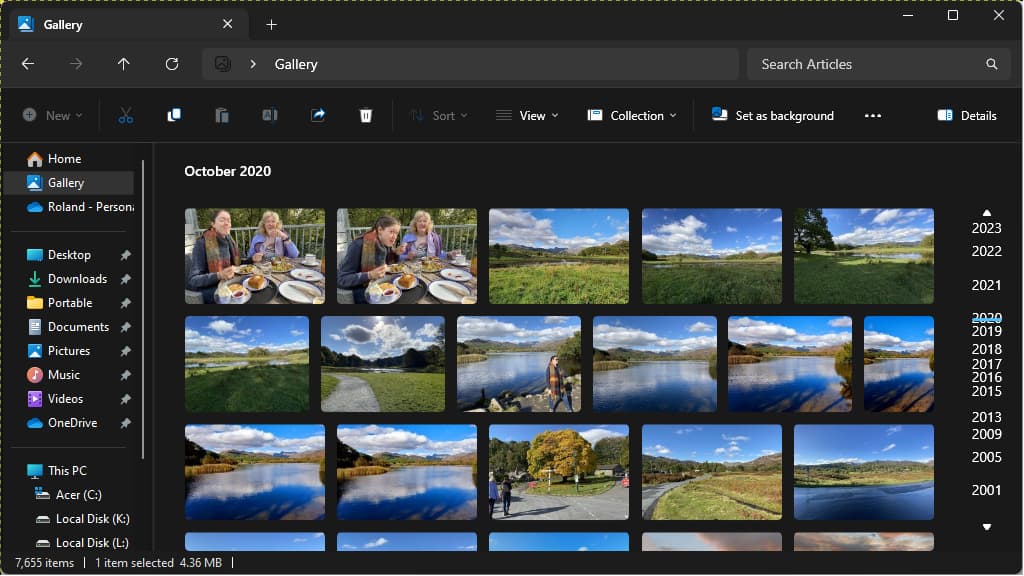
Browse your photos with Gallery in Windows File Explorer
File Explorer in Windows 11 has a great new feature that enables you to browse your photos as thumbnail images. Scroll through the years looking at all the photos you have taken. It’s fun.
 RAWinfopages